Quick start
This quick start guide outlines the steps to use the nanoCEM command line for analyzing our example data, which consists of the E. coli 23S rRNA around a known m6A site (A2030). nanoCEM will calculate alignment features and current event features within this target region.
Download the example data
git clone https://github.com/lrslab/nanoCEM
cd nanoCEM/example
The path to the downloaded data is as follows:
data/
├── wt/
│   └── file.blow5  # blow5 file for f5c
│   └── file.fastq # basecall result file
│   └── basecall.blow5  # blow5 file for move_table
│   └── basecall.bam  # blow5 file for move_table
│   └── single/  # single-format fast5 files for tombo re-squiggle
├── ivt/
│   └── file.blow5  # blow5 file for f5c
│   └── file.fastq # basecall result file
│   └── basecall.blow5  # blow5 file for move_table
│   └── basecall.bam  # blow5 file for move_table
│   └── single/  # single-format fast5 files for tombo re-squiggle
└── 23S_rRNA.fasta  # reference fasta file
Data format preparation
Before utilizing nanoCEM, it is required to convert the raw data format to the appropriate format blow5 and perform basecalling to obtain a fastq file. Subsequently, select a suitable reference fasta file. The current ONT default output is the pod5 format, here is a script to transfer,
# install package
pip install blue-crab

# blow5 to blow5
blue-crab p2s file.pod5 -o file.blow5
For more details and commands, please refer to the Data preparation from raw reads page.
Alignment feature visualization
To compare two groups' alignment feature, their fastq files, reference fasta file and the target position are required.Here is a script using our test data to visualize the alignment feature,
# get alignment visualization
alignment_magnifier -i data/wt/file.fastq  -c data/ivt/file.fastq  \
--chrom NR_103073.1 --pos 2030 --len 10 --strand + \
--rna --ref data/23S_rRNA.fasta --output nanoCEM_alignment_result
Then nanoCEM will output the alignment feature table called alignment_feature.csv and figure in
your target region as below, Sample is from -i and Control is -c

Current event feature visualization
For the current event feature, current_events_magnifier script is provided to visualize and analyse related feature.
Our default mode is based on f5c resquiggle, so our framework integrated the f5c commands.
In addition, nanoCEM also supports preprocessing result from f5c eventalign, tombo and move_tablefrom nanopore basecaller.
Notes: For tombo, although we have added support for it, you will need to set up the additional tombo environment and run tombo resquiggle command.
f5c support (Default)
Introduction
There are two modes in f5c, namely resquiggle and eventalign.
We have adapted both modes for our analysis and utilized the f5c resquiggle as our default preprocessing method.
Data preparation
Please make sure that the prefix of fastq, blow5 should be the same for each group (Sample and Control) just like below,
root
├── Sample
│   └── file.blow5
│   └── file.fastq
├── Control
│   └── file.blow5
│   └── file.fastq
current_events_magnifier
We have already organized our sample data, so we just need to run the current_events_magnifier script as below,
# run f5c resquiggle mode
current_events_magnifier f5c_re -i data/wt/file -c data/ivt/file \
--chrom NR_103073.1 --strand + --pos 2030 \
--ref data/23S_rRNA.fasta -o nanoCEM_result_f5c_re \
--rna --norm
Notes:
If you want to work with DNA data, please remember to remove the --rna option from your commands.
To use the r10 mode instead of the default r9 mode, add the --pore r10 option.
Additionally, you can enable base shift and normalization by using the --base_shift and --norm options.
For more details, you can refer to the command documentation.
And the introduction about base_shift, please refer it here
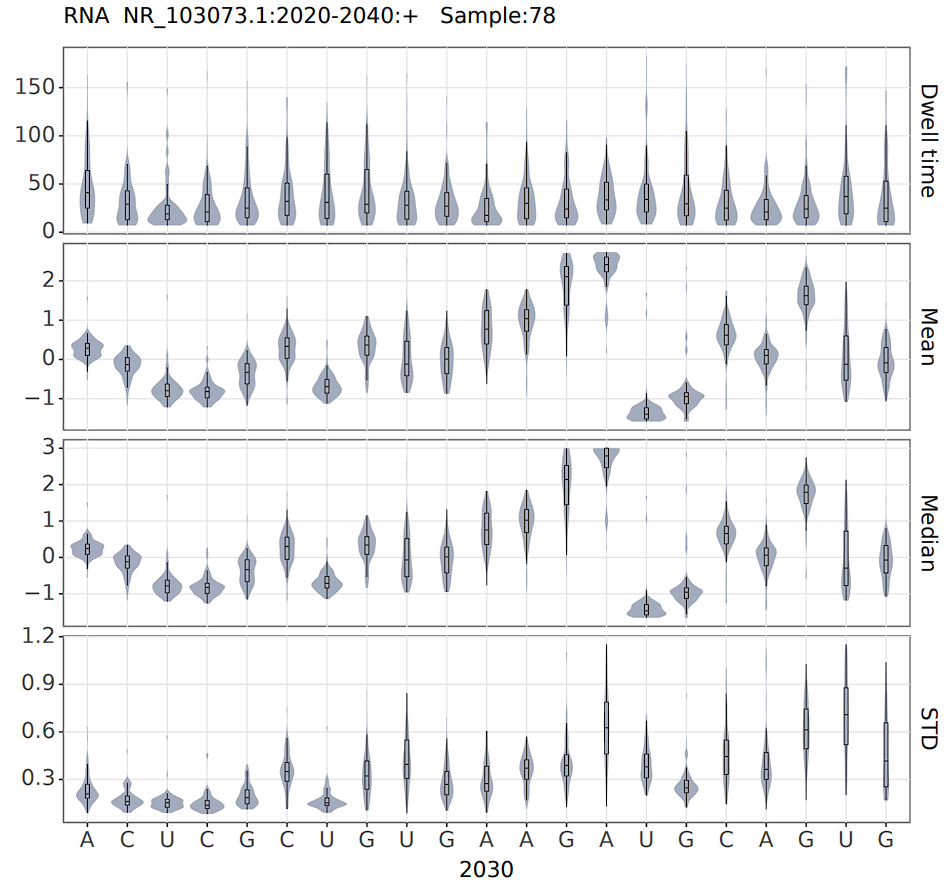
Then nanoCEM will output the current feature called current_feature.csv of your target region and plot it as below,

Meanwhile, to visually display the differences in current features of target position (A2030) between two groups, the 3-mer's feature will be collected within each group can be subjected to Principal Component Analysis (PCA).
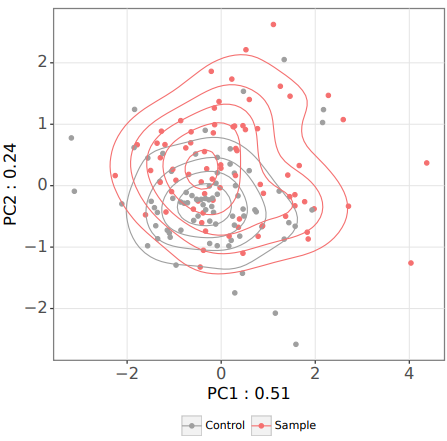
Finally, in order to demonstrate the difference in current between each point in the target region, we utilized MANOVA to analyze the results of PCA and determine the presence of statistically significant differences. MANOVA_result.csv and the figure below will be saved in the output path.
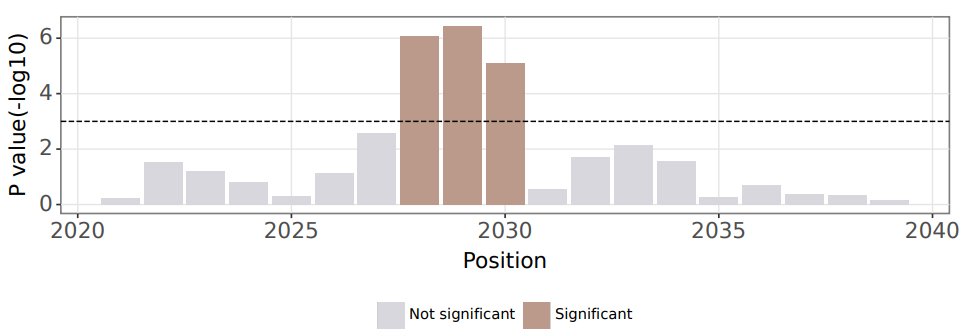
Notes: After extensive testing in various scenarios, we believe MANOVA may not always provide an appropriate significance level under certain circumstances. Firstly, it is influenced by sequencing depth; the deeper the data, the more likely it becomes significant. Additionally, unequal coverage can also impact the results. Therefore, we recommend using alternative statistical methods to test for differences in means based on the features in the feature table current_feature.csv.
f5c eventalign support
The data preparation and command for applied the preprocing method f5c eventalign are exactly the same as for f5c resquiggle,
except that the f5c_ev option needs to be used as below,
# run f5c eventalign mode
current_events_magnifier f5c_ev -i data/wt/file -c data/ivt/file \
--chrom NR_103073.1 --strand + --pos 2030 \
--ref data/23S_rRNA.fasta -o nanoCEM_result_f5c_ev \
--rna --norm
tombo support
In addition to f5c, nanoCEM also supports tombo, they are different in several aspects, including the re-squiggle algorithm
(which may introduce one base bias) and the supported data types (fast5/blow5). And nanoCEM achieves the same functionality by
providing the fast5 folder like the following workflow,
Data preparation
Tombo is a suite of tools primarily for the identification of modified nucleotides from nanopore sequencing data, and only support single-format fast5.
# pod5 to single-format fast5
pod5 convert to_fast5 file.pod5 --output </path/to/multi_reads>
multi_to_single_fast5 --input_path </path/to/multi_reads> --save_path </path/to/single_reads> --recursive
For Sample and Control group, files should be as below,
root
├── Sample
│   └── single/
│   └── file.fastq
├── Control
│   └── single/
│   └── file.fastq
tombo resquiggle
For Sample and Control group, run the commands below respectively, but for our example data, tombo resquiggle has been done and can skip this step
tombo preprocess annotate_raw_with_fastqs --fast5-basedir single/ --fastq-filenames file.fastq --processes 16
tombo resquiggle single/ ../23S_rRNA.fasta --processes 16 --num-most-common-errors 5
current_events_magnifier
Afterwards, you can run the current_event_magnifier function in the tombo mode to achieve the same functionality.
# run tombo mode
current_events_magnifier tombo -i data/wt/single -c data/ivt/single \
--chrom NR_103073.1 --strand + --pos 2030 \
--ref data/23S_rRNA.fasta -o nanoCEM_result_tombo \
--rna --cpu 4 --norm
Then nanoCEM will output the current feature called current_feature.csv and related figures as same as above figures of your target region
move_table support
In addition to f5c and tombo, nanoCEM also supports move_table from nanopore basecaller like dorado and guppy, they are different in several aspects, including the re-squiggle/eventalign algorithm.
nanoCEM support move_table by support paf file generated by squigualiser reform and re-index by bam file generated by minimap2
. And nanoCEM achieves the same functionality by providing the blow5 file and basecalled bam including move_table.
Data preparation
The move table records the index of events in basecalling.
In the resulting bam file from basecalling, this information is stored in the tags ns, ts and mv.
You can obtain this information using the following basecalling commands.
Notes: For dorado, recommend to use Dorado 0.4.3 to generate basecalled bam files with move_table, due to differences between event index length in bam and signal length in pod5 from Dorado 0.5.2. This issue has been reported on their GitHub and expected to address in the following updates.
# dorado basecaller
dorado basecaller [basecall model] [INPUT POD5] --moves_out> basecall.bam
# guppy basecaller
guppy_basecaller -c [basecall model] -i [INPUT FAST5 ] --moves_out --bam_out --save_path [OUTPUT]
samtools merge pass\*.bam -o basecall.bam
# slow5-dorado basecaller
slow5-dorado basecaller [basecall model] [INPUT BLOW5] --emit-moves > basecall.bam
For Sample and Control group, files should be as below,
root
├── Sample
│   └── basecall.blow5
│   └── basecall.bam
├── Control
│   └── basecall.blow5
│   └── basecall.bam
Parameters calculation
For signal index from move_table, sig_move_offset and kmer_length are required to pre-calculated table,
for the other basecall model or not mentioned in the precomputed table , users can run the script provided by
squigualiser called calculate_offsets.py
current_events_magnifier
Afterwards, you can run the current_event_magnifier function in the move_table mode to achieve the same functionality.
# run move_table mode
current_events_magnifier move_table -i data/wt/basecall -c data/ivt/basecall \
--chrom NR_103073.1 --strand + --pos 2030 \
--sig_move_offset 0 --kmer_length 1 \
--ref data/23S_rRNA.fasta -o nanoCEM_result_move_table \
--rna --cpu 4 --norm
Then nanoCEM will output the current feature called current_feature.csv and related figures mentioned above of your target region
Single mode
If you have only one sample and want to view specific regions of features, nanoCEM also provides a single mode, which supported all four
preprocessing method f5c resquiggle, f5c eventalign, tombo and move_table.
For example,
# run f5c mode
current_events_magnifier f5c_ev -i data/wt/file\
--chrom NR_103073.1 --strand + --pos 2030 \
--ref data/23S_rRNA.fasta -o nanoCEM_result \
--rna --norm
And the single mode will output the feature table and feature plot like blow,