An example for deeper application
After observing significant differences in the results of Principal Component Analysis (PCA), it is possible to train models specifically on the features of interest. Here, I will provide an example of training a model using XGBoost for the current_feature.csv from nanoCEM.
Prepare the data feature
In the current k-mer based RNA modification detection algorithms (such as nanom6A, xPore ...), most of them utilize 5-mer algorithms.
We provide the function extract_kmer_feature(result_df, kmer_number,target_position) to extract kmer feature from our output file and the example is as below
import numpy as np
import pandas as pd
from  nanoCEM.cem_utils import  extract_kmer_feature
df = pd.read_csv('current_feature.csv')
# extract_kmer_feature(result_df, kmer_number,target_position)
feature_matrix, label = extract_kmer_feature( df, 5, 2030)
label[0] = label[0].apply(lambda x: 1 if x == 'Sample' else 0)
Train and test
Perform k-fold cross-validation using XGBoost and calculate the average accuracy.
from sklearn.metrics import accuracy_score
from sklearn.model_selection import KFold

X = feature_matrix.values
y = label.values
kfold = KFold(n_splits=5)
# Perform k-fold cross-validation
accuracy_scores=[]

for train_index, test_index in kfold.split(X):
    # Split the data into training and testing sets for each fold
    X_train, X_test = X[train_index], X[test_index]
    y_train, y_test = y[train_index], y[test_index]

    # Create an XGBoost classifier
    model = xgboost.XGBClassifier()

    # Train the model on the training data
    model.fit(X_train, y_train)

    # Make predictions on the testing data
    y_pred = model.predict(X_test)

    # Calculate the accuracy score
    accuracy = accuracy_score(y_test, y_pred)

    # Store the accuracy score for this fold
    accuracy_scores.append(accuracy)

    # Calculate the average accuracy across all folds
avg_accuracy = sum(accuracy_scores) / len(accuracy_scores)
print(avg_accuracy)
Density plot
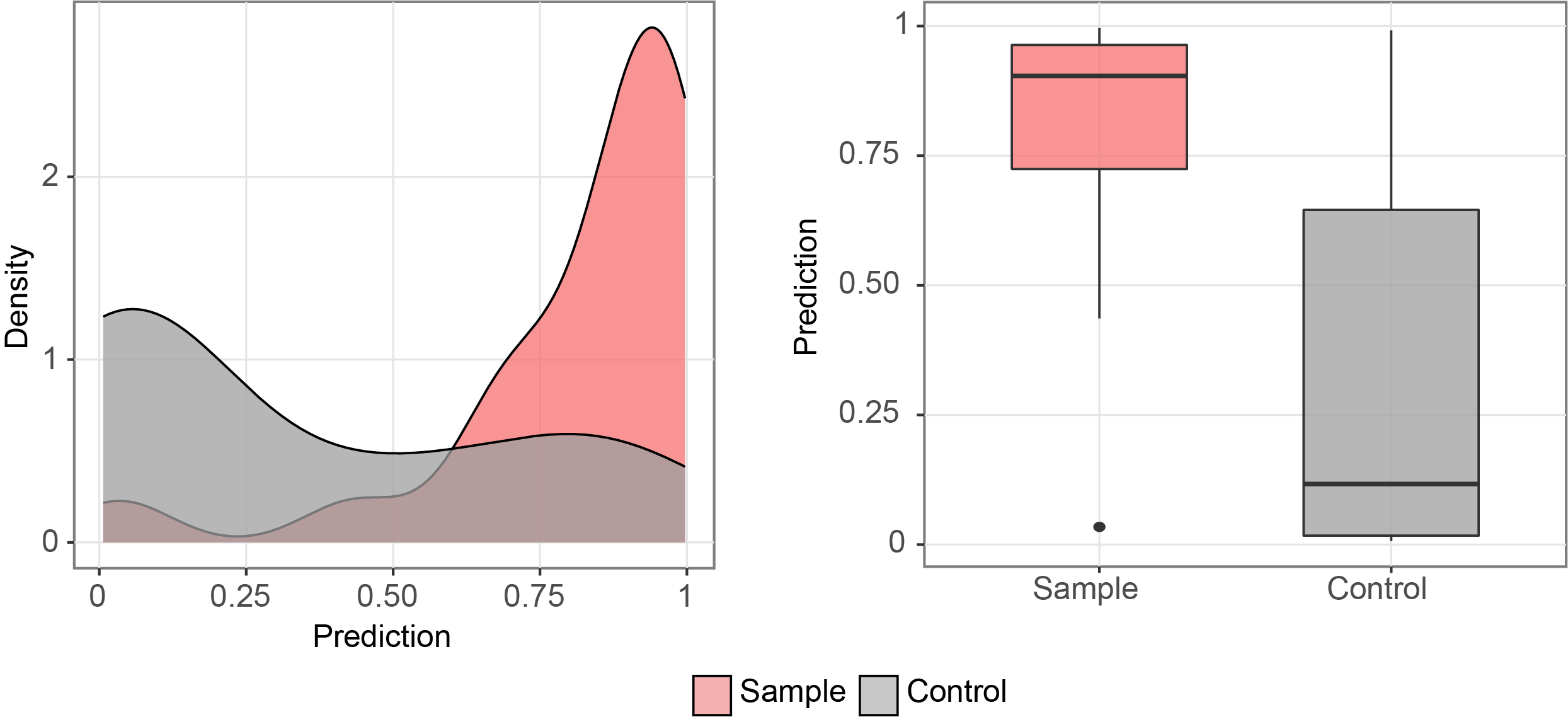
After obtaining the trained model, it is possible to visualize the distribution of the test data using tools like plotnine as below.
prediction_df = pd.DataFrame({'y_test': y_test.reshape(-1,), 'y_pred': y_pred})
prediction_df['y_test'] = prediction_df['y_test'].apply(lambda x: 'Sample' if x==1 else 'Control')
import plotnine as p9
category = pd.api.types.CategoricalDtype(categories=['Sample', "Control"], ordered=True)
prediction_df['y_test'] = prediction_df['y_test'].astype(category)
# visualize the first prediction's explanation
plot = p9.ggplot(prediction_df, p9.aes(x='y_test', y="y_pred",fill='y_test')) \
            +p9.scale_fill_manual(values={"Sample": "#F57070", "Control": "#9F9F9F", "Single": "#a3abbd"})\
           + p9.theme_bw() \
           + p9.labs(x='',y='Prediction')\
           + p9.geom_boxplot(width=0.6,alpha=0.7)\
           + p9.theme(
        figure_size=(4, 4),
        panel_grid_minor=p9.element_blank(),
        axis_text=p9.element_text(size=13),
        axis_title=p9.element_text(size=13),
        title=p9.element_text(size=13),
        legend_position='none',
        legend_title=p9.element_blank(),
        strip_text=p9.element_text(size=13),
        strip_background=p9.element_rect(alpha=0),
    )
print(plot)
For example, in the figure below: